We would like to present a small improvement that some customers have requested.
We have added an option to change the email which will receive all notifications sent by the system, such as opt-in and opt-outs, as described in these posts:
Notifications of new subscribers
So far, these emails were sent to the first email administrator registered, and if you wanted to change this email, it was necessary to change the Default administrator of your account.
With this new feature you don’t have to change the administrator, which is important because the administrator will receive login information, for example when you forget your password, the system will send it to the email administrator, therefore you can just change the email which will receive the notifications, without changing the administrator.
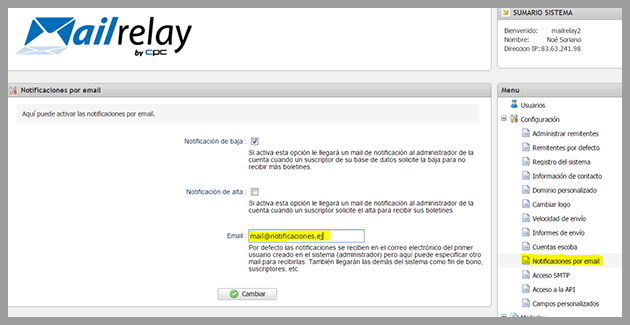
To configure this option, simply click on Settings -> Notifications by email and change the email address, adding the address you want to use:
Note that this email address will also receive other system notifications, such as information on package usage, ETC.