When you use the Mailrelay, free email marketing panel, the system will alert if the SPF record is not correct. But let’s see a simple and rapid procedure to make a check and make sure that your domain is properly authenticated.
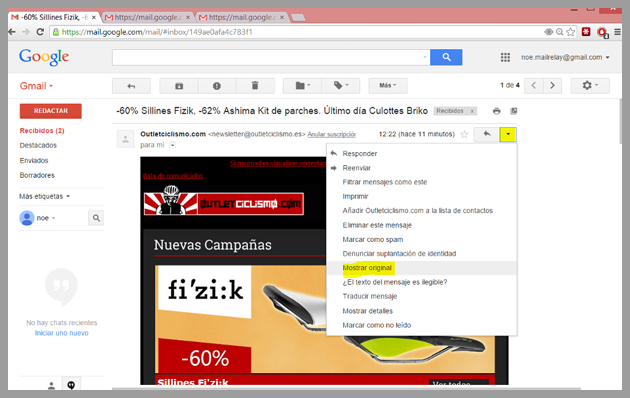
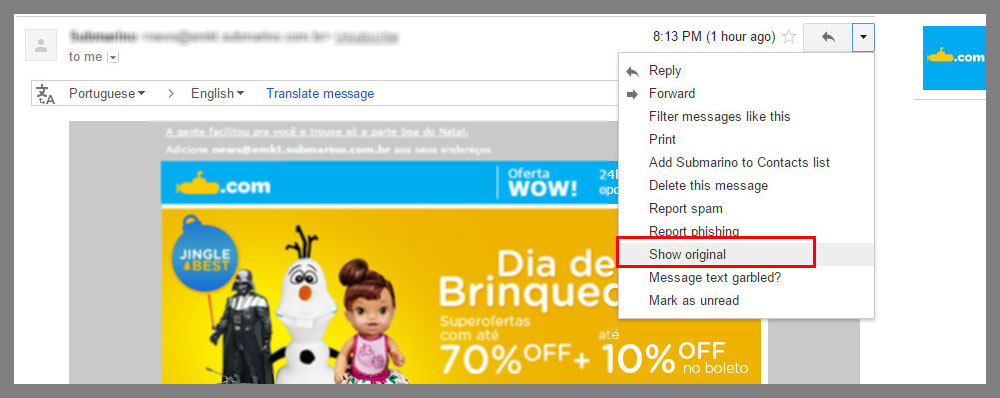
In addition, with this test, you can check if the DKIM is correct, if your account has this option enabled. You simply have to send an email to any Gmail account, open the message and from the available options, select Show original:
The system will open a window with the source code of the message, and you can find this line, “Authentication-Results: mx.google.com; you can see the result of the verification of the SPF and DKIM of your domain:
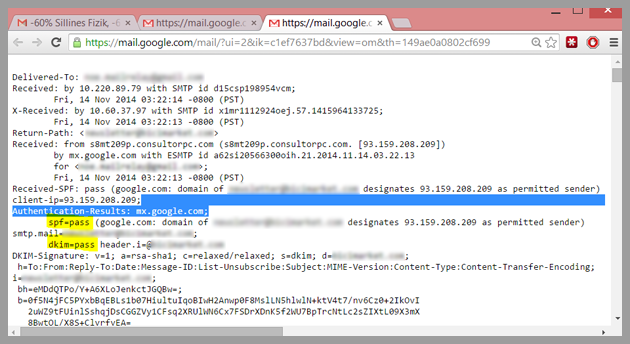
With this simple procedure, we can see these two parameters immediately, without wasting time using third parties testing systems who sometimes don’t give reliable information.
For more information on SPF and DKIM you can access these articles:
– The SPF protocol, an ally in the fight against spam
– How to create an SPF record for Mailrelay
– What is the dkim system and how does it work
Mailrelay, free email marketing is one of the best email marketing platforms you will ever find.