
Surely you would not think of using your WiFi without a password, would you? Any person could use your connection to access your computer, steal your data, surf the internet, Right?
Most people are aware that they need to use strong passwords to protect sensitive information such as Wi-Fi, credit card, etc.
However, when it comes to email, many users don’t know that they need to protect themselves, preventing misuse of their corporate information. Probably they are not aware of its importance.
Would you allow anyone to send emails in the name of your company, pretending to be you?
I don’t think so.
To avoid these problems, there are security measures and technical settings, such as SPF that you can add for your sender domain.
What is the SPF?
In short, and for you to understand, the SPF will indicate the IPs that can send using a domain. This means that it should be configured so that only you, or the email marketing software you use, can send e-mail on your behalf.
[su_box title=”According to Google:” box_color=”#27334d” title_color=”#38aaf8″]It is a DNS record, (Domain Name Service) that identifies the email servers that can send messages on behalf of your domain. [/su_box]
What can happen if it is not configured correctly? Or if it is not configured?
Several things:
[su_list icon=”icon: exclamation-triangle” icon_color=”#38aaf8″]
- Your emails may be considered spam.
- Or even not be accepted by the servers
[/su_list]
Why?
[su_list icon=”icon: hand-o-right” icon_color=”#38aaf8″]
- If it is not configured, the destination server may not know if the message was actually sent by you, so the filter might think it is Spam, and so add the email in the spam folder.
- If it is not configured correctly, it may not even allow Mailrelay to send your emails.
[/su_list]
How do I check my current SPF?
You can do several things:
[su_list icon=”icon: hand-o-right” icon_color=”#38aaf8″]
- * Contact the Mailrelay Support Department so that they can check it for you.
- * Or contact with your hosting.[/su_list]
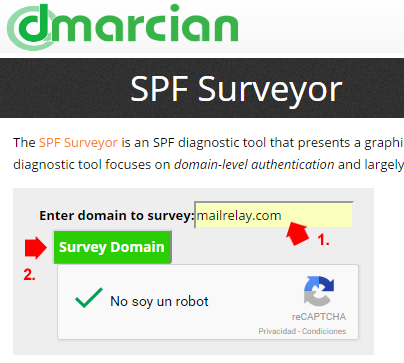
You can also check the SPF on this page:
[su_list icon=”icon: hand-o-right” icon_color=”#38aaf8″]
- Check SPF at dmarcian.com[/su_list]
Just enter your domain name in the box below and Click on Survey domain:
On the next screen, you’ll see something like this:
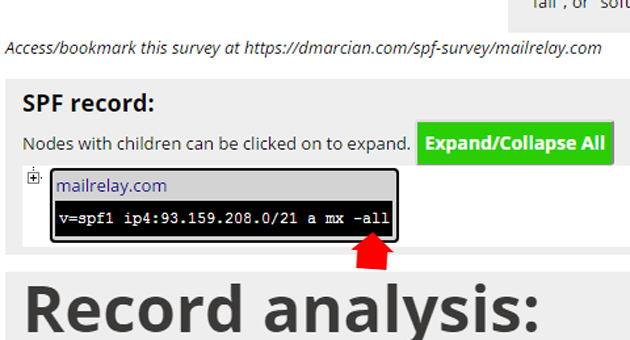
It is important to verify the record correctly.
What happens if the SPF includes -all?
This word, “all” means that only the IPs listed in this SPF line can send email using the sender domain.
If the setting doesn’t use -all, but is different, such as +all, The string will be more “open.” But if the record uses the -all command, only the listed IPs can send emails from this domain.
Why use -all?
It is very likely that your domain is configured that way, because the domain/hosting providers configure the DNS as restrictive as possible to prevent users from sending spam.
Thus, it is quite possible that it is configured this way, and you can’t send emails before changing it.
What do you need to do to send emails using an email marketing software?
You will have to include the follow string:
include:yourMailrelayAccount.ip-zone.com
So that your domain can allow Mailrelay to send your emails.
That is, Mailrelay will not be able to send emails with the domain until the the SPF record is correct
So that Mailrelay can send emails On your domain name, the SPF needs to be modified to include:
include:accountname.ip-zone.com
If you don’t have an SPF record for your domain, you can add a record like this:
v=spf1 include:changeitforyouraccount.ip-zone.com a mx -all
Or contact your hosting to set it up for you. For example, you can send them this message:
[su_box title=”Mensagem ao seu provedor” box_color=”#27334d” title_color=”#38aaf8″]
Hello,
I need to add an SPF record for my domain, or modify it to add this value:
Include:changeitforyouraccount.ip-zone.com
So that the records will be like this:
V=spf1 include:changeitforyouraccount.ip-zone.com a mx -all
V=spf2.0/pra include:changeitforyouraccount.ip-zone.com a mx -all
If this domain already have an SPF record, please update it to include the new string, without deleting the other ones.
Thanks.
[/su_box]
However, if you have any questions, please contact:
[su_list icon=”icon: check-circle” icon_color=”#38aaf8″]
- The Mailrelay staff
- Or your hosting
[/su_list]
But it is always, always advisable to have the SPF properly configured and checked before sending newsletters.