2 articles in one, recovering carts in prestashop, and how to configure the plugin to use our email marketing software as an SMTP server.
In this article you will find several interesting informations.
Trying to recover abandoned carts is essential for any online shop.
According to an article in the magazine Entrepreneurs, 3 out of 4 carts are abandoned before checkout.
And this number is increasing, as the competition in the online world grows, where your competitor’s story is just one click away from yours.
The same article analyzes data on the reasons which the client decides to leave the cart, the main ones are (in order of importance):
–
-> Higher freight costs
-> The user probably will not purchase your products
-> Higher administrative costs
-> The user decides to buy the product later
-> The user didn’t know he would have to pay for the sipping costs
-> No option to purchase as a guest
-> The user Needs more information
-> The purchasing process is complex
-> The website is too slow
-> The user couldn’t find enough payment options
The truth is that there are many factors, so the possibility that the user will abandon the cart is very high.
What can we do?
The most important thing is to try to contact the prospective client to convince him to purchase the product.
This is where comes in an email marketing software (you can use Mailrelay for sending your campaigns) configuring our SMTP server.
Although you can set general parameters, each particular case will be different.
How can we do this?
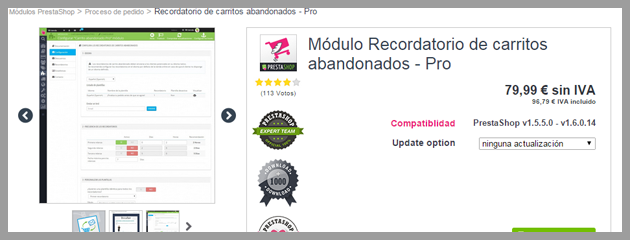
If you work with Prestashop, there is a very good plugin, developed by the prestashop team (this ensures good compatibility and support).
This is the module:
Module abandoned cart reminder Pro
It is true, the price may seem high, but I think if you have an online store, it is an investment in a useful tool.
The plugin allows you to set various parameters such as templates and frequency of reminders.
It is very interesting that they suggest the best reminder frequency.
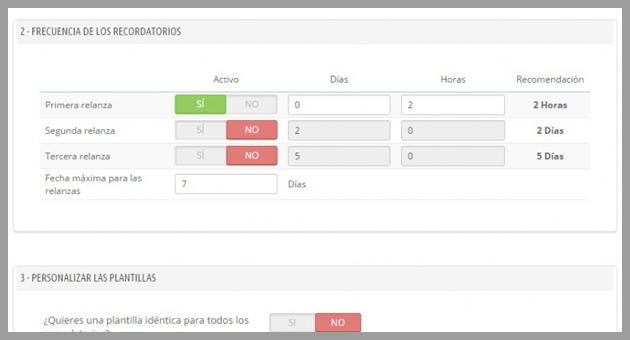
It is especially recommended to send three reminders by email:
1) After 2 hours
2) after 2 days
3) After 5 days
Besides allowing three types of discounts:
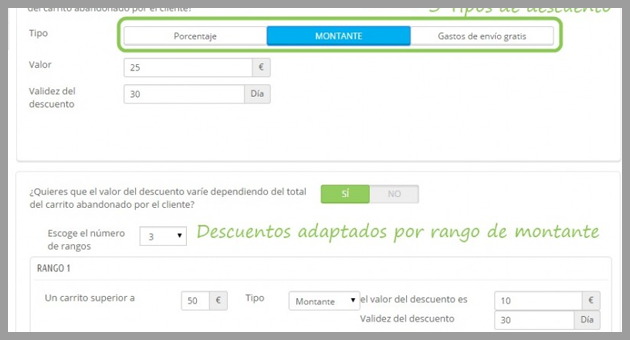
1) Percentage
2) Amount
3) Free Shipping
With the option to adjust these discounts based on total of the cart.
This is very interesting because:
1) after 2 hours, it is likely that the customer is visiting other websites, comparing prices, etc. If you could contact the customer and offer a discount, you will have more opportunities to show him that your offer is the most interesting.
In this email you could also take the opportunity to offer to help him with anything the user needs.
Note that as the time between the visit and the reminder is very short, perhaps the user stopped the buying process for various reasons and in some cases a discount could help the customer to change his mind, that is why you should offer help and information.
2) After two days, it may be that he is still thinking of buying, or comparing products and prices.
Depending on the value of the product, product type, two days is not a long time, and there are great chances that the customer is still considering whether or not to purchase the product.
It might be a good time to send a reminder to this user, offering more information, or any other discount.
3) After five days, it is less likely that the customer is thinking or comparing products. Except perhaps for more expensive products.
If this is the last email you will send, it’s time to send a very interesting offer, such as free shipping, or a significant discount.
You may not have much profit, but you will gain a new customer.
Besides these email marketing actions 1-1…
If it is a new customer, who just registered, it could be the case that he didn’t decide to buy anything from your store.
An autoresponder could be a good alternative for this type of subscriber, generating confidence in the potential customer. Our email marketing software provides autoresponders for the free accounts, we recommend you try it.
Sending newsletters with articles from your blog can also help to remind your customers your company is active and with new products.
As well as special promotions for both old and new customers.
If the subscriber trusts in your company, the relationship will be much better, as the user himself can inform you if he is facing any problem. If the user trusts you, he could get in touch, saying, “I could not purchase the product because the process failed when the cart…”
If the user doesn’t trust in your company, he will leave your website, to never come back.
And how can you use an email marketing software to configure an SMTP server?
Now let’s talk about it [:)]

Adding an SMTP server to Prestashop and using an email marketing software?
It is really very easy to configure SMTP in Prestashop and this will allow you to send your campaigns without worrying about the existing limits imposed by your hosting.
Perhaps you won’t need it at first, but when your store is active and with several customers, you will have to send several emails, or confirmation messages, purchase notifications, abandoned cart reminders, etc. It is very easy to reach these limits.
With your Mailrelay account, you will have an email marketing software, to send your emails using our online or by SMTP, which can be configured in Prestashop.
The first step is to go to the advanced settings menu -> Email:
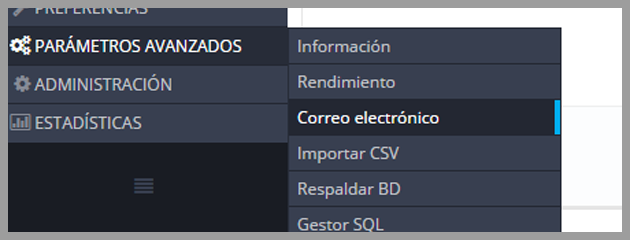
Then select the button to “set your SMTP options”
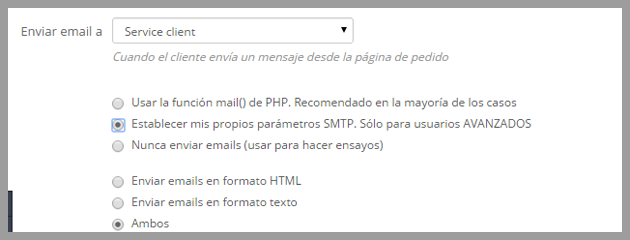
Although there is a message saying this option is for advanced users, the truth is that it is not that complex.
After selecting this option a new form appears where you can insert the SMTP settings you received from Mailrelay:
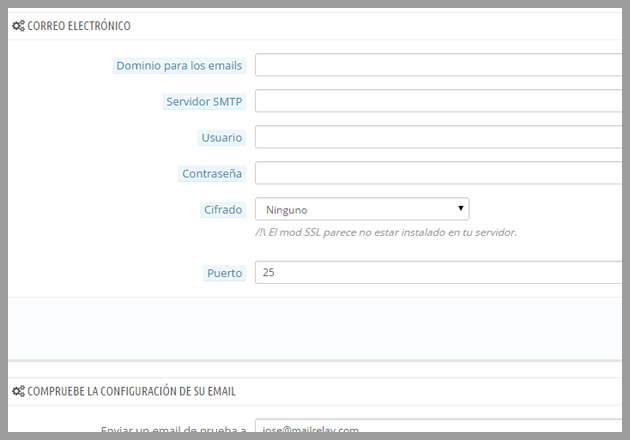
When creating your Mailrelay account, you will receive an email with the smtp settings, the plugin also allows you to test your configurations.
And with that you have our email marketing software configured for Prestashop, which will remove the restrictions you would have if sending using your hosting.
In short
It is essential to work with abandoned carts, if you are managing an online store, it will be important to use all the available tools to contact your leads.
In this article, we saw a very interesting module that will help you with this task.
In addition, we learnt how to use the Mailrelay email marketing software to send these reminders, as well as other emails.
We hope this article is helpful!