IMPORTANT: if you work with Mailrelay V2, you will not be able to use subdomains with an SSL certificate, as this could lead to security warning errors. If you use V3 (accounts created after March 2019), you can set up a subdomain with an SSL certificate.
A custom domain will replace the generic domain used on our email marketing platform, to use the domain of your own company or organization on all links you add on a newsletter.
This has two benefits, first, your newsletters will have a better brand image with all links using your own domain, secondly, if the general domain is blacklisted, this would not affect your email marketing campaigns.
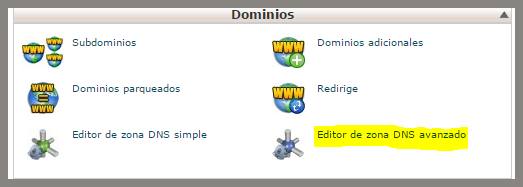
Let’s see how we can set up a subdomain on cPanel in a few simple steps. Please note that each server has its own options, this is just an example. If you are unsure how to set up the subdomain, we recommend you contact the support of your hosting. Select the Advanced DNS Zone Editor.
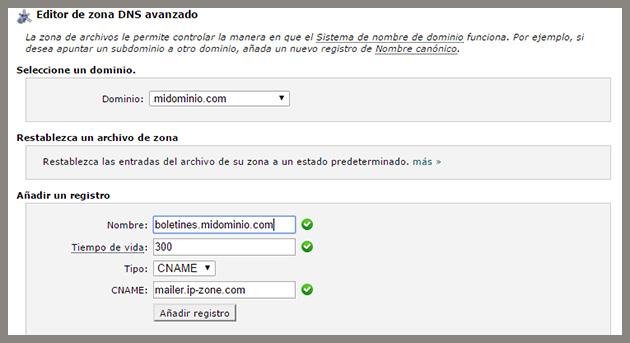
On the next screen, probably the system will request that you select a domain, select the one you want to edit.
In the Name field, add the subdomain you will use, for example, newsletters.mydomain.com or mailing.mydomain.com
For TTL, you can use 300
For Type, select CNAME
And in CNAME add mailer .IP-zone.com
Now save the settings to create the subdomain and it will be added to your DNS.
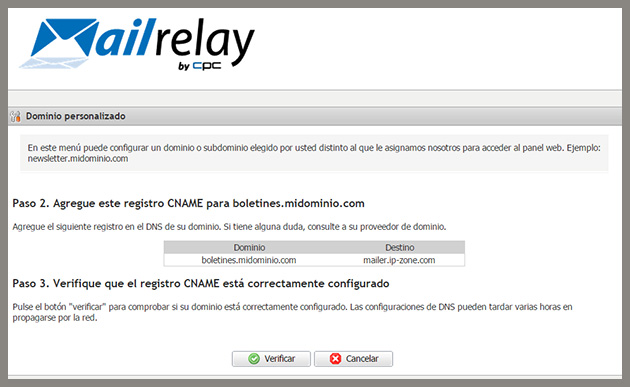
After that, you will need to add it on your Mailrelay panel. To do that, just click on Settings->Custom domain, add the subdomain and click to check and verify it.