As you know, Mailrelay provides a wide variety of free newsletter templates so you can send your email campaigns. Many newsletter templates can be used to send RSS campaigns with the latest news from your website or blog.
Furthermore, we recently added the option to use templates when creating RSS campaigns, as we have seen in this article.
Well, today we are adding other newsletter templates, specially designed for RSS campaigns.
If you don’t know how to create an RSS campaign, we recommend you read this tutorial before continuing:
RSS for email marketing with Mailrelay
First, you must click on Newsletters -> RSS for newsletters, then click on the Create button, to configure the options of your RSS campaign. On this screen, you can click the “Use Template” button.
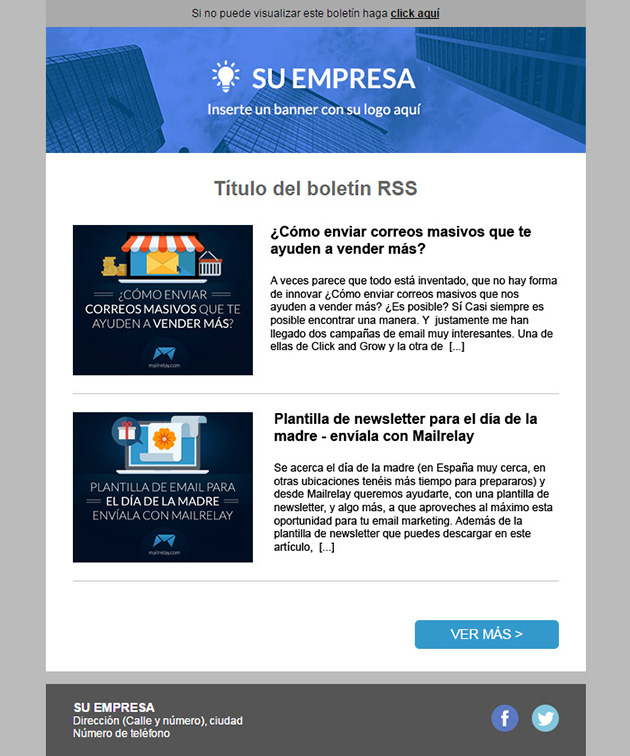
In this menu you can select the new newsletter template, which has several visual advantages when compared with common templates, the first aspect is that the main elements are included, as the title, the post description and the image.
This image is located in the left column (if Your post includes an image), and the title text on the right. Each post is divided by a line, therefore you don’t have to worry about having display problems, because the newsletter template was created specifically for this type of campaign.
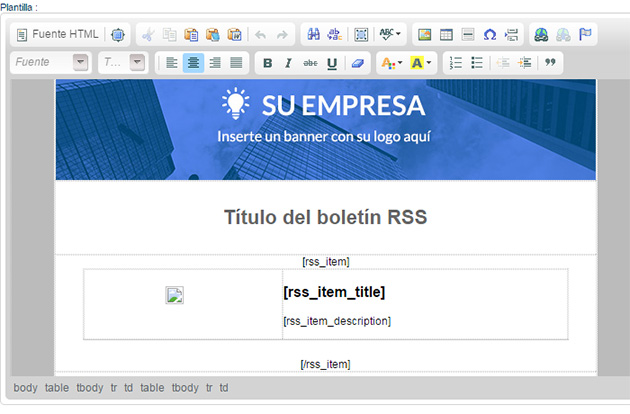
After editing it, you will see the newsletter template in the editor:
Like most newsletter templates for RSS, when your subscribers receive it, they wont see the tags, but the correct newsletter, for example, with this campaign:
We hope this newsletter template can be useful to you, to post your RSS newsletter, you can send the number of posts you want and with any frequency.
If you need more information about our newsletter templates, our team is at your disposal.