
Is it possible to develop a website without popups and increase your mailing list? Today, I’m going to share with you some ideas based on my experience trying to optimize my blog for mobile devices.
As you know, mobile website optimization is more and more important. In Google’s new test to find out how your site works in computers and mobile devices, Three reasons are given for that:
[su_list icon=”icon: arrow-right” icon_color=”#38aaf8″]
- It is five times more likely that a user will leave a site if it is not optimized for mobile devices.
- Nearly 50% of visitors will leave a site on mobile devices if the pages don’t load in three seconds.
- 9 out of 10 people use multiple devices when they need to perform tasks like a flight reservation or manage their finances.
[/su_list]
A website without popups?
The announcement was made by Google in August 2016: they would start to penalize in search results, websites with popups (emerging windows) considered intrusive for mobile devices in January 2017.
Pop-ups are a very useful feature in digital marketing, as they allow you to capture the attention of visitors to a Website and help to increase the email list. If you have created them correctly and offer an attractive lead magnet, it can generate a high conversion rate.
But the purpose of Google by reducing or eliminating the use of popups is to improve the user experience of your site in a mobile device.
I used all kinds of popups on Blogpocket. My goal was to help grow my subscriber list. The incentive was a series of ebooks that my visitors can download for free if they give me their email address.
I used several tools. From WordPress plugins such as Optin Monster, to Sumo popups. I even tried to work with one of the most intrusive popups (but more effective) from Sumo, called “Welcome Mat”. With this popup in full screen, configured with all kinds of multimedia features (Photos, videos, etc.), I managed to increase the conversion rates considerably.
What popup strategy am I following on Blogpocket?
There are two issues with using popups: a high percentage of users doesn’t like these windows. In addition, some tools cause pages to load very slowly. In the latter case, I had problems for example with Sumo.
So my last strategy is to remove any pop-ups on my blog for the mobile version. I understand that for some, this can seem very radical. But I figured out how simple it becomes the navigation with AMP pages, for example. I would like to make two considerations on strategies without popups and AMP.
[su_list icon=”icon: arrow-right” icon_color=”#38aaf8″]
1 With the AMP version of my mobile blog, and other optimizations, my blog is loading in less than 3 seconds.
2 AMP doesn’t allow JavaScript execution, so the design and the functions are very limited. However, there are plugins for WordPress as “AMP for WP” with which you can significantly improve the layout and add almost all the functions we use normally. For example, we can place calls to action with An extension.
[/su_list]
How can I increase my mailing list without popups?
What solutions can be adopted in the website version for desktops?
I will now explain how I managed to keep increasing the number of subscribers on my mailing list with Mailrelay using AMP page (which doesn’t allow popups).
I should point out that, so far, the technique I’m using just works for desktops. I may not care much about losing new subscribers (those who visit my blog via mobile devices)
Because my audience coming from mobile devices is around 20%. And as I indicated before, there is the possibility of adding CTAs to AMP pages.
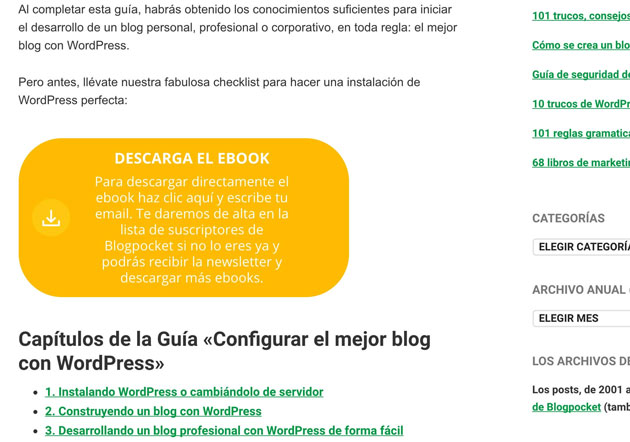
The image above corresponds to one of the fancy boxes displayed in my blog. It’s not a pop-up. It’s another configurable “banner” which invites the reader to download one of my ebooks. The “fancy box” also is optional. Instead you can replace it with plain text.
When clicking, the reader will be directed to a page more like a popup (see image below).
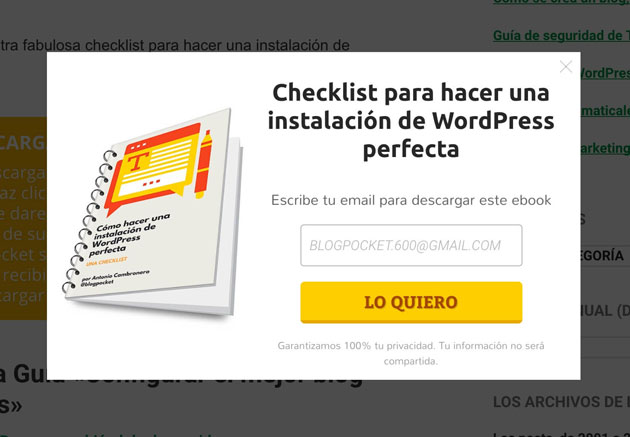
There is a substantial difference between this mechanism and a popup: it is the user who decides to open the window. Therefore, this page is not considered intrusive: You are not invading the space of the user without permission and the visitor has made a decision based on trust.
The method is based on a technique called “content upgrade.” With this method, you can hide additional content in your articles. This bonus content (extra) is only accessible in exchange for an action.
There are many WordPress plugins for creating content upgrade. Social Locker allows, for example, to hide content, which will be visible only in exchange for a social action (tweet, like, +1, etc.)
However, to attract new subscribers, I’m using a paid plugin for WordPress called precisely content Upgrades.
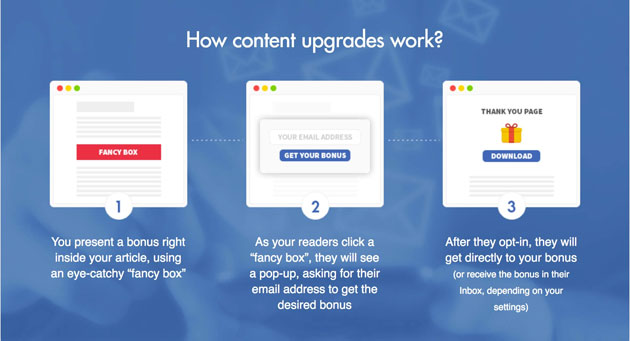
It is a very useful plugin, with several options that I am using in my blog with very positive results. Let’s see some configuration options for creating content Upgrades with this plugin.
The configuration of your content upgrades with this plugin is very simple. For example.
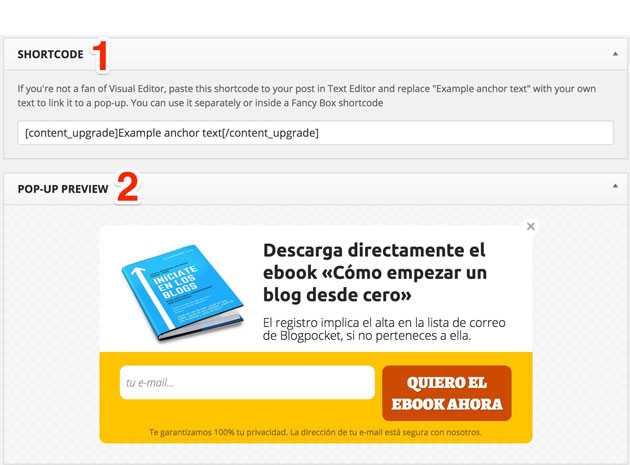
The image above shows the configuration section of a “Content The first thing we see is the “shortcode” that you can paste in any article from your blog (1). All you have to do is replace the text “Example anchor text” for what you want to use. The alternative, would be to set up “fancy boxes”. To customize a “fancy box” you just need to go to the “Fancy boxes” section.
In the “Shortcode” section you can preview the popup, (2) which will change as you customize it (see image below).
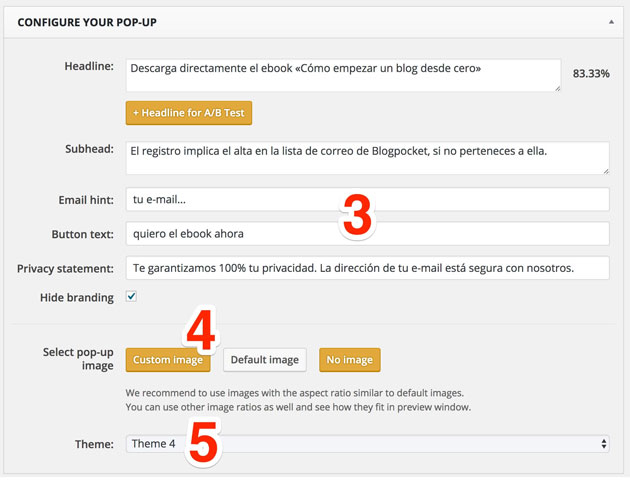
To customize the popup, you can use the fields (3), including an image (4). There are some templates to choose from (5).
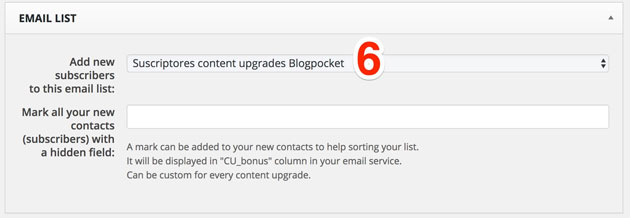
In the image above you can see the connection section with a list of specific emails belonging to one of the email marketing services that integrate with the plugin (6). The bad news is that for now, the integration with Mailrelay is not available yet, but there is the possibility of receiving the new subscribers using another option. Don’t worry, a few lines down, I will explain another “trick” to bring the captured subscribers with this plugin to Mailrelay.
In addition to the list that will be used, you can add a value determined in the column “CU_bonus”, which will allow you to differentiate subscribers who came from a content upgrade or another for targeting purposes.
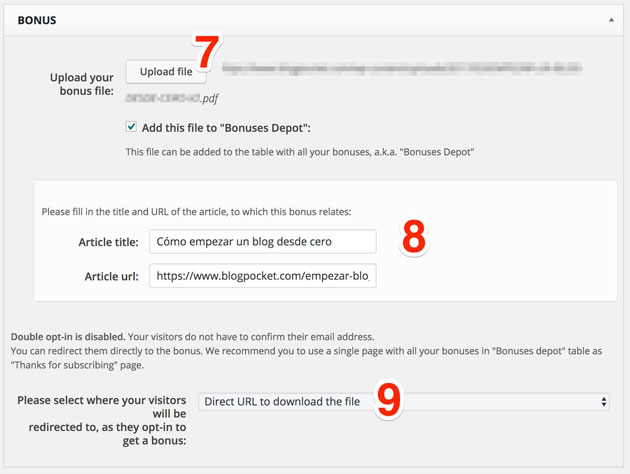
The interesting part is to offer direct download of a PDF, for example. This is defined in the section that you can see in the above image. The PDF file can be loaded by clicking on the “Upload File” (7). The association between an article from your blog and the “Content upgrade” to be defined is done by title written and the URL in the appropriate fields (8).
There are three ways for users to have access to additional content (9)
- direct the user directly to the URL where the PDF is hosted.
- directing the user to a “Thanks for subscribing” page
- by directing the user to a custom page.
I do this with option 1 and the users can view or download the PDF directly if they prefer to do so.
The other options involve the use of “Bonus Depot”, a kind of repository “bonuses” that should be inserted by a table on the thank-you page or on the custom page through a “Shortcode”. When you upload the PDF (7) You should choose whether you will add the “Bonus Depot. “The shorcode and the management of this repository will be accessed by going to the “Bonus Depot” option.
Now the “Settings” section.
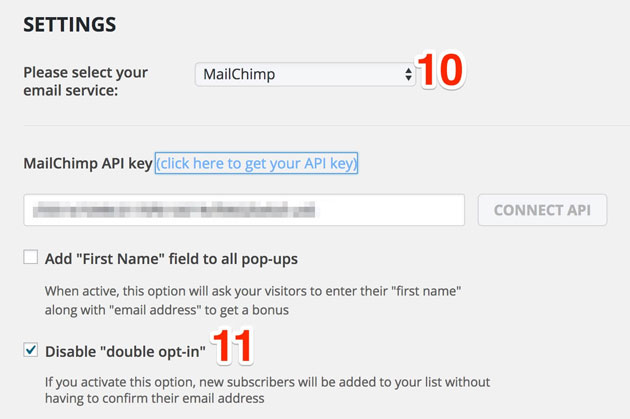
We said that the plugin doesn’t connect with Mailrelay. How can we send the captured subscribers to Mailrelay? Very easy: We will use MailChimp as a bridge. To do this, we’ll use their API and choose this email marketing client (10) (see the above image).
Why did we disable the double “opt-in option” (11)? Precisely because MailChimp will only be used as an intermediary software and we don’t have to add more steps or confuse the user. For our new subscribers and those who already are registered (who must also click to access the extra content) the process should be as transparent as possible.
The list of emails that is selected (6) will be displayed as long as it was created in MailChimp.
How to insert MailChimp subscribers to Mailrelay?
To add new subscribers to Mailrelay, you simply will have to export the list periodically (I do this once a week before sending the newsletter) from MailChimp to a CSV file.
And after that, I just have to import to Mailrelay the file with the MailChimp list. To do this, go to the option “Import> Import file” selecting the CSV, the group and clicking the “Import” button.
The subscribers already included will not be added again, so the process can be repeated without fear of duplicate contacts.
With Zapier we will be able to automate the process, including the removal of the list from MailChimp, when Mailrelay activates this integration for all users.
Conclusions
Somehow, the content upgrades plugin can be considered a popup.
However, it is not intrusive because it looks more like a page with a form. It is displayed only if the user wants to access the content. Therefore, it is essential that the “fancy box” or the text is sufficiently clear about what is offered and what will be the CTA.
With this technique I continue to increase the number of subscribers to my mailing list, from users who visit my blog via desktop.
For mobile devices, I deleted any popup due to the AMP usage format. But with the “AMP for WP” plugin we can add CTAs, therefore, I’ll be able to get subscribers through mobile devices in the future. 🙂