
If you are developing a CRM, APP, plugin or another type of plugin, integrating Mailrelay can be a very interesting option to highlight your product or service.
The advantages are many:
[su_list icon=”icon: asterisk” icon_color=”#008af7″]
- You will offer more options to your users, something that will always be positive
- Mailrelay is a leading email marketing tool with hundreds of thousands of users; you can take advantage of this visibility
- Some of these users will use your system
[/su_list]
This integration is, in fact, a very easy process, thanks to the Mailrelay API.
However, to make your work even easier, today we will see a tutorial that will clarify all the doubts you may have in the process of integrating Mailrelay with your system.
Let’s get started!

Which Mailrelay API functions will we need during the integration process?
In this article, we will look at an example of a basic integration, that is, how to synchronize the users of your CRM, APP or plugin with Mailrelay, so that your customers have their contacts available on their account and can send them newsletters.
Integrating Mailrelay in this way is very easy.
Also, there are advanced options, such as sending email campaigns from your APP, CRM, etc. But this already requires further development, and although the process is the same, it would increase somewhat the extent of this article.
Anyway, if you think it would be something of interest, you can leave a comment, and we will try to prepare another post in the future about this.
Now, for the integration we mentioned, we will need these API functions:
[su_list icon=”icon: asterisk” icon_color=”#008af7″]
[/su_list]
Nothing else, with these functions we can integrate the software, and we will see how to do it.
► What is the process you need to follow to integrate subscribers with Mailrelay?
It is very easy, step by step, what we will do is:
[su_list icon=”icon: asterisk” icon_color=”#008af7″]
- Verify that the contact you want to add already exists in Mailrelay
- If it doesn’t exist, it will be added to the email marketing software
- And, if it exists, it will be updated, if necessary
- Optionally you can delete or unsubscribe it, if necessary
[/su_list]
Let’s see the process step by step.
1) Verify that the subscriber already exists
The first thing is to check if the contact already exists, because if it doesn’t exist, it can be added, as it is not possible to have duplicate emails on Mailrelay.
To check this, we will use getSubscribers.
In the API description, you can see an example of the code that you can use, which is something like this:
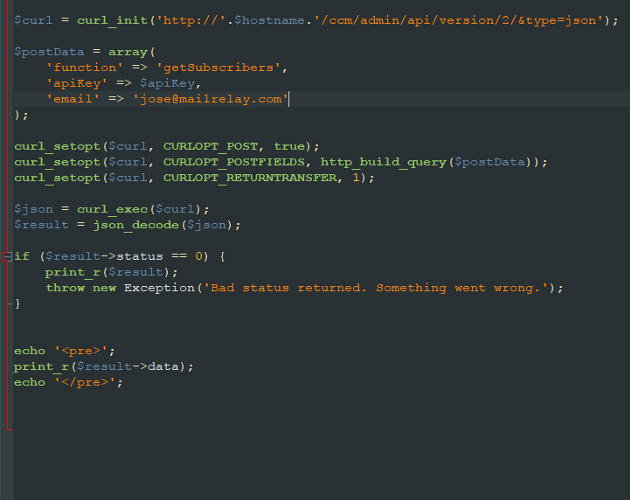
It is the basic code to check if a contact already exists, the query will be done using the email address.
If the contact exists, the system will return an array with all the subscriber information such as name, email, groups in which it is registered, etc.
And also, the subscriber ID:
Array
(
[0] => stdClass Object
(
[id] => 2
[name] =>
…
And in case the contact doesn’t exist?
In this case, the function returns an empty array.
Array
(
)
As it is empty, you will know that this email does not exist on the system and you can add it.
So far, integrating Mailrelay with any software seems very easy, isn’t it? Well, don’t worry, it will not be complicated.
2)Add a new subscriber
If the subscriber doesn’t exist, we can add it, although for sure you will wonder what happens if we try to add a subscriber that already exists? Well, nothing serious, the system simply would warn you that it can’t be done:
[su_list icon=”icon: asterisk” icon_color=”#008af7″]
- stdClass Object ( [status] => 0 [error] => email: El email ya existe )
[/su_list]
And therefore it would not add it.
In this case, to add a subscriber, we will use the function addSubscriber With a code similar to the following:
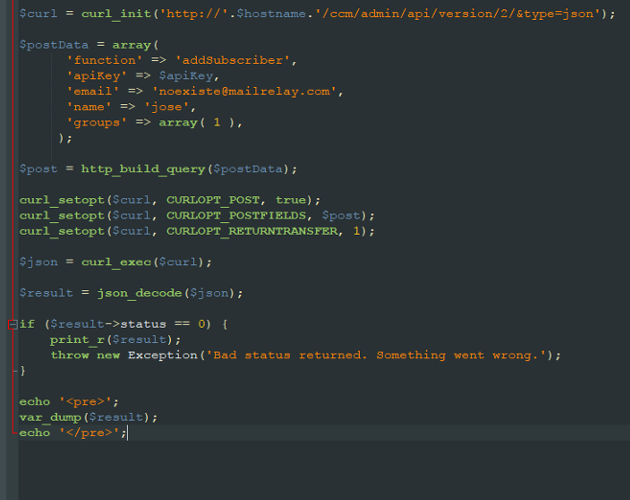
The basic and required parameters are:
[su_list icon=”icon: asterisk” icon_color=”#008af7″]
- Name
- And the group
[/su_list]
Important: The contact will already be active and will not need to be confirmed by email, because it is importing from a CRM system, e-commerce, etc. And so the contact should already have been validated before being registered on our software.
If necessary, the contact may be inactivated and can be activated via a confirmation email, for example, but by default, it is understood that the use of the API is only for the migration of previously validated data.
What would return this call?
If the call is made positively, what it would return would be something such as:
object(stdClass)#1 (2) {
[“status”]=>
int(1)
[“data”]=>
int(9)
}
We should pay attention to the fact that it will return the subscriber ID (in the example it would be 9).
Well, so far, two processes have been done, we checked to make sure the subscriber exists, and if it does not exist, we added it. The next step is to update a subscriber that already exists.
3) Update an existing subscriber
This is a usual case, after going through the first step, we can update the subscriber by using the updateSubscriber function:
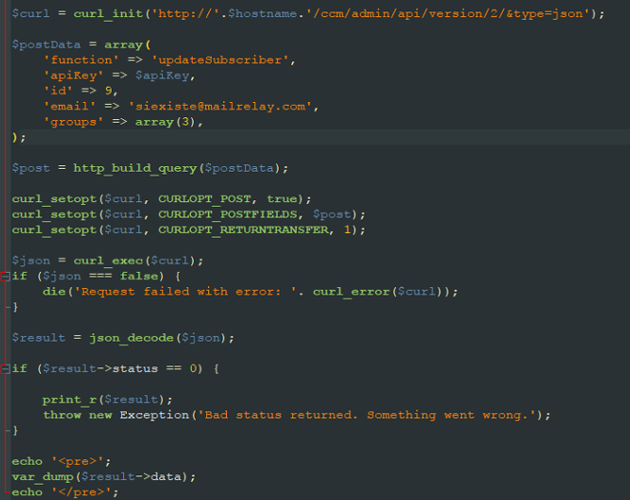
If the function works, it returns:
bool (true)
This code is also straightforward, but there are some points to take into account:
[su_list icon=”icon: asterisk” icon_color=”#008af7″]
- You will need the subscriber ID; this can be obtained in step 1 with getSubscribers
- You will need to inform all groups to which the subscriber will be registered
[/su_list]
This last point is essential so that I will emphasize it.
This function requires that all the data of the subscriber are informed. For example, if the subscriber already belongs to group 1 and in the array groups you indicate the value 3, the subscriber would belong only to group 3.
If you want the subscriber to be registered for group 1 and group 3, you must indicate both values in the array.
The same happens with custom fields (customFields), if they are not indicated, the custom fields will be empty. You will have to indicate all the data you want to add for the subscriber.
It’s not a problem.
Because in step 1, with getSubscribers, all the data was already obtained.
4) unsubscribe and deleteSubscriber
These two functions, unsubscribe, and deleteSubscriber can be used without any problem, just insert the email address of the subscriber.
What’s the difference?
Opt-out, unsubscribe, allows the subscriber to subscribe again in the future, whereas if it is deleted, it can’t be added again.
That is the difference. There are more functions in the Mailrelay API to create an email, get statistics, import a database, etc.
However, in this brief tutorial, I wanted to explain only the functions which allow you to integrate Mailrelay with various types of software, such as APPs, plugins, CRMs, etc.
And in any case, the use of the API is very simple and intuitive, including examples of use in PHP for most functions.
Reasons to integrate Mailrelay into your CRM, APP, plugin or any other software.
The reasons for integrating Mailrelay are many, on the one hand, Mailrelay is one of the major email marketing tools. This means that a large number of users are using our software and the integration process will be even more profitable.
Mailrelay is also a software used by large companies, bloggers and countless small businesses and SMEs, with the largest account free of charge:
Therefore, the integration can also help to gain visibility.
Also, integrating Mailrelay is very easy thanks to the API for developers, and it is something that several companies have already done, such as:
[su_list icon=”icon: asterisk” icon_color=”#008af7″]
- Thrive Leads
- Privy
- MyThemeShop
- Optingun
- Etc.
[/su_list]
They already offer extra features to their users.