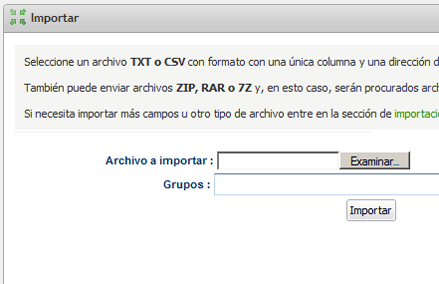
In this article, we are going to explain a very important concept, bounced email, and how Mailrelay manages these emails. The first thing is to understand is what happens when we import our list of subscribers. We already know that to import a list of email addresses, we need to access the
“Import” menu and select the “Import” submenu:
How Mailrelay manages bounced email addresses
During the import process, Mailrelay reads the file with the email addresses and inserts them in your account to be used later. As Mailrelay is reading this account file, it may detect some accounts that have already bounced in the past.
Let us explain this a bit more. Mailrelay has a shared database for all its users, even though this works internally and is not visible from the user panel (users can see their own list of bounced email addresses). The purpose of this database is to save the accounts that have bounced in previous outgoing messages and discard them.
There are two types of bounces, soft bounces (temporary) and hard bounces (permanent). In the first case, a bounce could have resulted from the inbox being full or a temporary failure of the recipient server, among other reasons. In this case, Mailrelay attempts to send the message every 15 minutes for an amount of time determined by the recipient server and internal specifications in order to deliver it later if possible.
In the second case, a bounce occurred because the email address was wrong or expired, etc.
Mailrelay’s database of bounced emails only contains emails whose servers responded with permanent bounces.
Each time a Mailrelay user sends a newsletter, bounced emails are detected and inserted into this database, so that when another user imports an email contact file, these emails are checked against the database of bounced emails, and if any match, they go directly to the list of bounced email addresses.
As a result, your Mailrelay account will never send emails addresses that we know have already bounced previously, saving you from sending messages that will fail. This will also keep your account’s reputation from suffering as a result of sending messages to these email addresses.
ERASING AN EMAIL ADDRESS FROM THE LIST OF BOUNCES
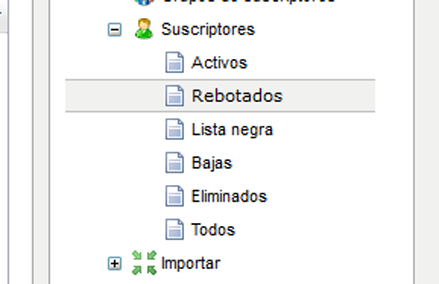
We can see the list of subscribers whose emails have been detected as bouncing by going to the “Subscribers” menu and then to the “Bounced” submenu:
How Mailrelay manages bounced email addresses
This list will show only the bounced email addresses in our account and they may not be eliminated. However, we can edit and modify these email addresses to make corrections to them if they contain typos. The corrected addresses will then become active.
It is a common mistake to think that bounced email addresses are included when calculating the limit of subscriber accounts in Mailrelay. This is not accurate; the subscriber limit does not count imported emails or bounced emails. The limit is calculated based on messages sent to distinct email accounts. Therefore, there is no reason to erase bounced email addresses.
If you’d like to know more about the subscriber limit on your Mailrelay account, please read the following article:
https://blog.mailrelay.com/es/2012/01/05/como_funciona_limite_suscriptores
¿WHY DOES MAILRELAY HAVE A COMMON DATABASE OF BOUNCED EMAIL ADDRESSES?
Mailrelay has a common database of bounced email addresses not only for the reason mentioned above, but also in order to help users’ newsletters make it to their subscribers’ Hotmail, Yahoo, AOL, etc. inboxes. Mailrelay has made an agreement with these ISPs.
As a result of these agreements, and to guarantee the quality of sent messages, these servers do not allow messages to be sent to email addresses that have been detected as permanent bounces.
The greatest advantages of the bounced email database are:- your contact list is cleaned of invalid email addresses as soon as they are imported.-It protects your domain’s reputation from sending messages to addresses that we know will bounce.-Not sending messages to accounts that we know will bounce saves sending expenses in your account.
HOW IS AN EMAIL ADDRESS DETECTED AS A PERMANENT BOUNCE?
The detection process used to verify if an email has bounced is simple and allows us to distinguish between bounces due to temporary factors (like if this inbox is full) or permanent reasons. Among these, we can find various causes, such as:
– Bad mailbox. This indicates that even though the domain is correct, the full address is not (the part before the @). For example, in the email address [email protected] the server portion is correct (hotmail.com) but demo123 may be incorrect or may not exist. The recipient domain gives us this diagnosis.
– Bad domain. In this case, the domain is incorrect. One example could be [email protected], given that (hotmail.comm) may not exist.
But how does Mailrelay know if it is this type or error or a different error? Normally, when the message is sent, the recipient domain returns a code indicating the result of the operation. It is a numerical code that Mailrelay can interpret. Let’s look at some possibilities:
– 250 OK – is the code that the server returns if the message was delivered correctly.
– 400 TEMPORARY ERROR – This is a temporary error and Mailrelay will try to resend the message later.
– 500 PERMANENT ERROR – if the error is permanent. In this case, the subscriber is marked as bounced.
There are different variations of errors 400 and 500, which we can see in more detail:
Error code Error message Type of Error
bad-configuration The messages were rejected due to problems in the configuration of the remote server Error 5.X.X
bad-connection The messages bounced due to connection problems with the remote server Error 4.X.X
bad-domain Messages bounced due to invalid or nonexistent domains Error 5.X.X
bad-mailbox Messages rejected due to an incorrect, invalid or nonexistent recipient email address Error 5.X.X
content-related Messages rejected due to issues related to the content (possible SPAM, sender is on a black list, etc.) Error 5.X.X
inactive-mailbox Messages were rejected due to the recipient account having expired, being inactive or disabled. Error 5.X.X
message-expired Messages bounced because they were not delivered after bouncing Error 4.X.X
no-answer-from-host Messages bounced due to no answer being received from the remote server after connecting Errors 4.X.X o 5.X.X
other Messages were rejected due to other reasons Errors 4.X.X o 5.X.X
policy-related Messages were rejected or blocked due to policy issues Error 5.X.X
protocol-errors Messages were rejected due to errors in SMPT protocol syntax Error 5.X.X
quota-issues Messages were rejected or blocked due to quota issues Error 4.X.X o 5.X.X
relaying-issues Messages were rejected or blocked due to delivery issues in the remote server Error 5.X.X
routing-errors Messages bounced due to routing problems in the recipient domain Error 5.X.X
spam-related Messages were rejected or blocked due to issues regarding SPAM Error 5.X.X
virus-related Message rejected or blocked due to issues regarding a virus Error 5.X.X
Synchronous and Asynchronous Bounces
In addition to the above, we need to clarify that there are two types of bounces: synchronous and asynchronous bounces.
Synchronous bounces are identified in real time when the message is sent to the recipient server from Mailrelay via SMTP, so Mailrelay knows the result of the sent message based on the response provided by the recipient server.
On other occasions, the recipient domain returns a 250 code to Mailrelay, indicating that the message was delivered correctly. But following this, it returns the rejected message to the sender’s inbox.
In this case, we are talking about an asynchronous bounce (since it is identified as a bounce after the fact).
This will help keep our sending lists clean and effective. There is also software provided by third parties that process these bounces automatically, which are necessary when we have a high volume of outgoing messages.
¿DO YOU BELIEVE THAT ONE OF THE EMAILS ON YOUR BOUNCED EMAIL LIST IS THERE IN ERROR?
As we have already mentioned in this article, only permanently bounced emails are added to the bounced emails list. However, it could be that some emails that were detected as definitive bounces, due to being nonexistent, for example, were created at a later date.
It could also be the case that a recipient server returns a permanent error due to an internal failure within the server, despite the fact that the account is functioning correctly. Even though Mailrelay has detection systems for these problems, it is possible that a correct email address was identified as a permanent bounce due to a failure in the recipient server, but is, in actuality, correct.
If you believe that one of the email addresses on this list should not be on the bounced emails list, please contact us so that we can verify this email, and if necessary, remove it from the list of bounced emails.
We hope that this article has been helpful to you, and if you have any questions, please contact us through our social networks.