Contact Form 7 + Forms 3rd party + Mailrelay

mailrelay , Invited guest @ Mailrelay

The subscription form is an indispensable part of any email marketing strategy, but it is not always easy to insert it properly on the website or blog, right? Today we will see how to add a form with the Contact Form 7 plugin.

The Contact Form 7 plugin can also be used for a subscription form?

Well, it's true, it is usually used for creating contact forms

But what if there was some way to use it for this purpose?

Yes, using a tool called Forms 3rd party integration

This plugin adds the option to integrate with external services such as Mailrelay, to create forms in WordPress plugins, specifically:

Contact Form 7 : https://wordpress.org/plugins/contact-form-7/

Ninja Forms : https://ninjaforms.com/

Gravity Forms : http://www.gravityforms.com/

Specifically for this example we'll use the Contact Form 7 plugin, because that's the one I already installed on my demo WordPress [:)]

Step 1. Integrating Contact Form 7 + Forms 3rd party + Mailrelay

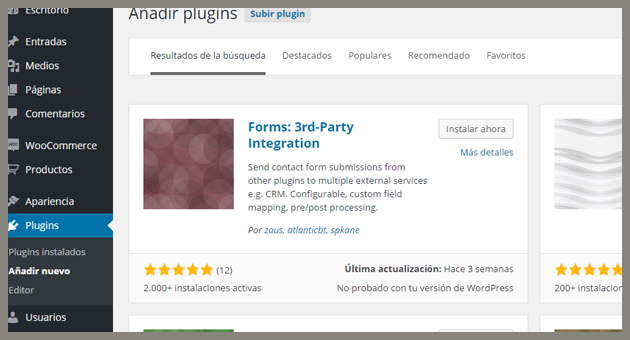
Assuming you have already installed the plugin Contact Form 7, you will have to install the plugin Forms: 3rd-Party integration, to do that, just click the plugins menu on your wordpress and install it:

Once installed, it will appear in your plugin list:
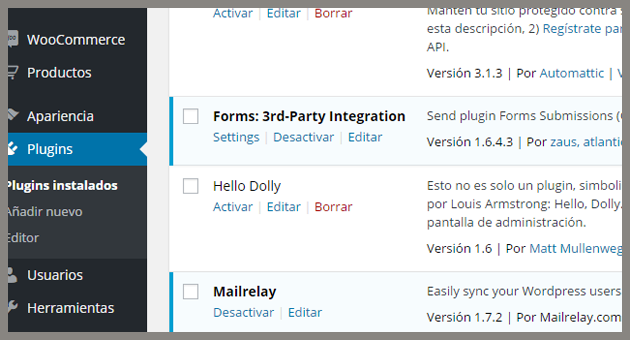
forms-3rd-party-2

It is very important that you have installed Contact Form 7, Ninja Forms or Gravity Forms because otherwise, this plugin will not be useful for anything.

Step 2. Creating or editing a form

You will have to create or modify a form that has already been created.

You can do this from the Contact menu if you use Contact Form 7:
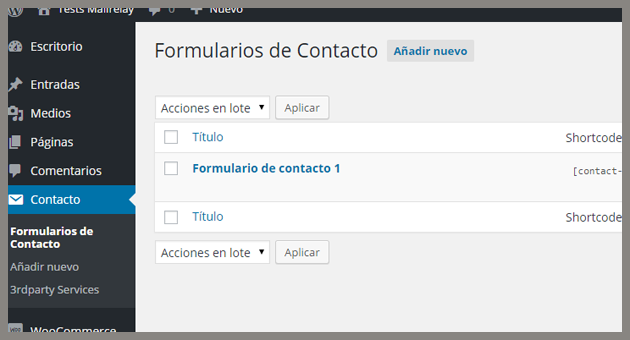
forms-3rd-party-3

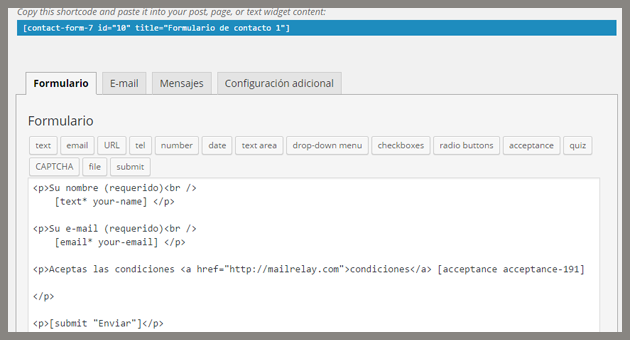
Creating or editing a form is very simple, as it is a completely visual process, you just have to click on the item you want to add:
forms-3rd-party-4

We created three fields:

A text field for the name (your-name)

E-mail field for the email (your-email) a checkbox, which is a field that the user will have to mark to send the form (ideal when it is necessary that the user accepts the terms of use)

In the image, you will see a shortcode, it is important to copy it because we will need it to complete the process.

And that is it, just save the form.

Step 3. Adding the form on the website

To add the form to the website, we will use the shortcode we copied in the previous step.

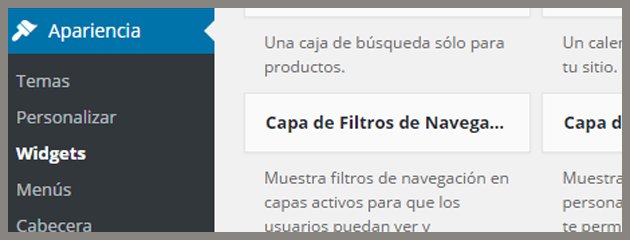
And to add it, we will use a widget, so click the Appearance menu and on Widgets:
forms-3rd-party-5

You can use any widget you want:

forms-3rd-party-6

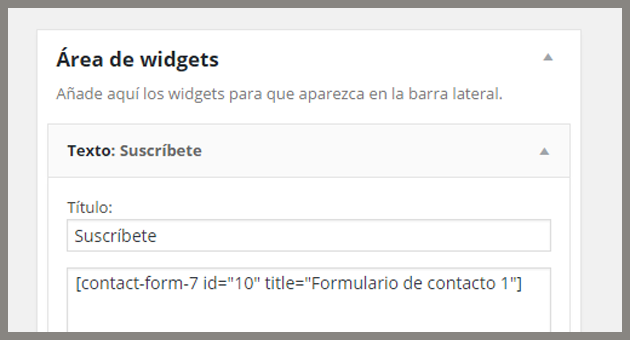
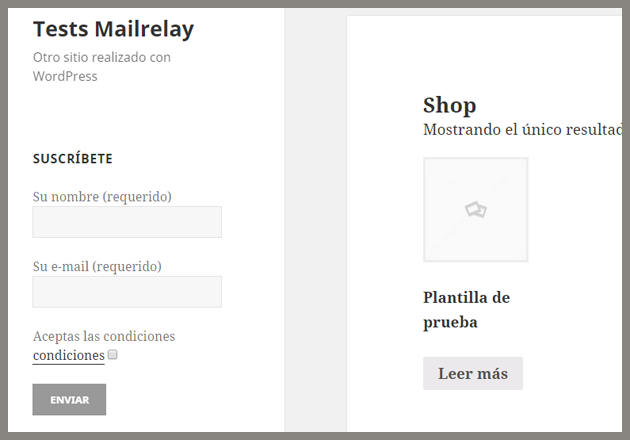
Be sure to paste the shortcode correctly, save it, and in the public area of your WordPress you should see something like this:
forms-3rd-party-7

The advantage of contact Form 7 is that it uses the same styles of the template, so you won't have any major formatting problems.

Note the acceptance checkbox was also added, therefore if the user doesn't check this box, the system will not allow the suscription.

As you can see, it was very easy to add the form on a WordPress site. How do you get this form to send the new subscribers to Mailrelay?

Step 4. Synchronizing Contact Form 7 with Mailrelay

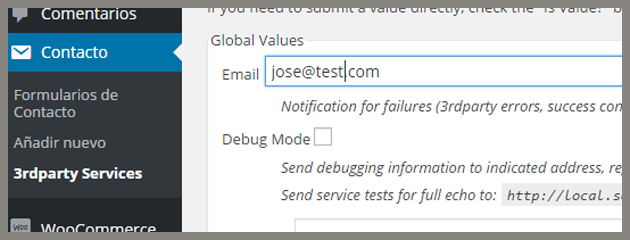
In this step we will use the plugin Forms 3rd party integration, to access it, click on Contact -> 3rparty Services:
forms-3rd-party-8

To properly configure this section we need the URL of the Mailrelay subscription form.

You can get this url on your Mailrelay panel, clicking on Opt-in -> Get form Code:
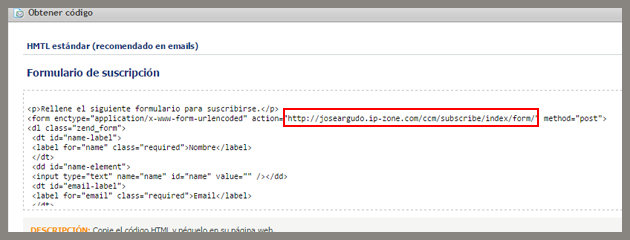
forms-3rd-party-9

Copy the "action form" URL.

Go back to your WordPress and in the middle of the page you will see a section that indicates 3rd-Party Service: Service 1:
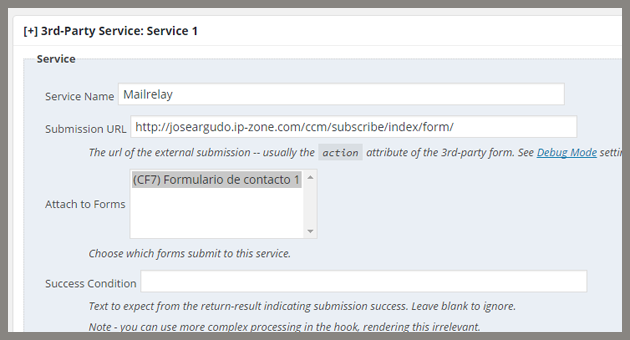
forms-3rd-party-10

Service Name -> The service name

Submission URL -> Here you should enter the URL of the Mailrelay form, that was copied before

Attach to Forms -> here we will indicate to what forms we will associate this service, in this case we only have one.

The next section is the most important: Mapping
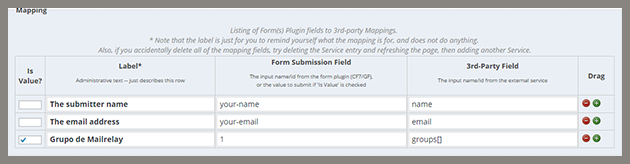
forms-3rd-party-11

The mapping is where we indicate which fields of the form will be matched  with the fields of the service, in this case Mailrelay.

The first column can be easily seen.

The second is a tag to be used internally.

The third one is the Form field of the Contact Form 7 plugin.

And the fourth is the Mailrelay Field.

Therefore, we have this data:

Field # your-name -> is the Mailrelay field name

Field # your-email -> is the field "email" for Mailrelay

And match all the fields as well.

But in the third line, the "is value?" field (the value is 1). This means it is a fix number that will be sent by the system, not a value for the user to enter, the value is the group ID on Mailrelay, where the user will be registered.

The group ID is 1 and the field type is groups []. Now just save the changes.

Step 5. Testing the form

When a new user is registered, the subscriber will be created on Mailrelay:
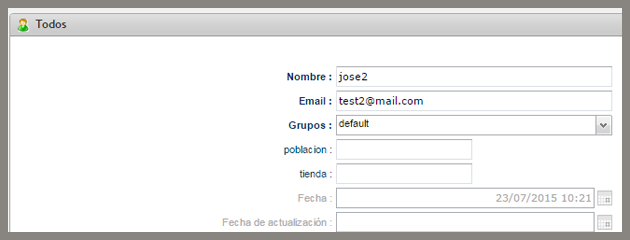
forms-3rd-party-12

It will also send the information by email:
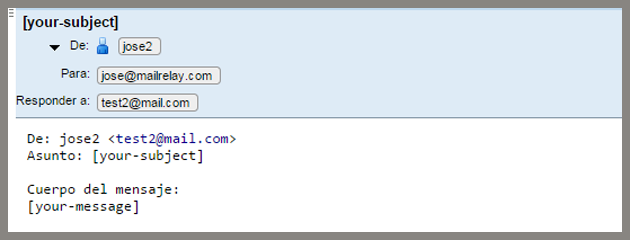
forms-3rd-party-13

That's all!

It is very useful, because Contact Form 7 is easy to work with and it allows you to easily:

Add Required fields Add a captcha Etc.

Note: You can change the texts of your form, accessing the Messages menu, if you want to make some small changes to your suscription form.

This is a very useful plugin, and the possibility of sending the collected data to your Mailrelay account  using the plugin Forms 3rd party integration, will offer a perfect combination for creating suscription forms in just a few steps.

We hope this tutorial is useful!


Comments

    1. ¡Hola Antonio! En este caso los plugins utilizados son para WordPress. Si utilizas otro sistema, como Prestashop por ejemplo, ya dependerá de los plugins disponibles para dicho sistema. Y si no ya se haría necesario programarlo a medida.

  1. Hola, yo soy usuario de sus servicios y me encantaria que hicieran un Post similar pensando en los usuarios que utilizamos Jommla ya que nos sentimos un poco desplazados por los de WordPress

  2. Piensan actualizar los plugins para importar listas desde opencart versión 2.

    1. Hola Francisco, lo cierto es que el plugin de Opencart ha presentado muy poco uso desde que lo publicamos, muy pocos clientes lo utilizan. Seguramente sí que se actualice, pero no creo que sea de forma inmediata.

  3. Qué gran post!! Muy útil, ya era hora de poder conectar Contact Form 7 con MailRelay de forma sencilla! Gracias por la explicación, un saludo 😉

    1. ¡Hola! En caso de que no sea posible añadir código HTML, la solución más sencillas es colocar una imagen, que enlace al formulario por defecto de tu cuenta: http://cuenta.ip-zone.com/mailing-manager/subscribe

      Solo tienes que sustituir “cuenta” por el nombre de tu cuenta y la imagen enlazaría con el formulario de suscripción de tu cuenta. Pruébalo y si te surge cualquier duda nos consultas.

  4. Hola
    muchas gracias por esta información.
    Lamentablemente no me a funcionado correctamente, he seguido cada paso y no he tenido éxito alguno.

    Saludos!

  5. Solucionado mi problema, estaba mal configurado CF7.

    Ahora, mi problema es el siguiente, al momento de que una persona se subscriba a mi sitio web, le llega un correo electrónico de confirmación, el problema es que el idioma en el que se envía es en portugués ¿cómo puedo cambiar el idioma por default del correo de confirmación?

    Saludos!

    1. Hola Hugo, es posible forzar el idioma en caso de ser necesario, pero es mejor revisarlo bien primero. Déjanos un ticket de soporte y te echamos una mano.

  6. ¿Es posible hacer lo siguiente?
    En un primer formulario le pido al usuario nombre y correo. Pero en un segundo formulario le pido Ciudad de residencia y correo.
    En caso de que, por ejemplo, un usuario complete los dos formularios con el mismo correo ([email protected]) pero los otros dos datos son diferentes (en el primer caso el nombre y en el segundo la ciudad) ¿Se actualizará la información de contacto del suscriptor o se duplicara? Espero haberme explicado bien.

    1. ¡Hola Elvis! La verdad es que nunca he probado a hacer lo que comentas, pero lo que es seguro es que no se puede duplicar pues en Mailrelay no puede duplicarse un email.

  7. Buenos días,

    Tengo la plantilla Flatsome instalada y viene por defecto con ‘ninja form’ como formulario, y me gustaría saber dos cosas:

    1) ¿Se puede crear una newsletter directamente con ninja form, o tiene que ser vinculado con Mailpoet (por ejemplo)?

    2) En caso de necesitar Ninja Form + MailPoet, ¿cómo puedo vincular el botón de “envío” de un ninja form para que mande una newsletter de Mail Poet?

    Es decir, yo tengo creado mi formulario con NinjaForm pero la Newsletter la gestiono con MailPoet, sin embargo, si hago una “redirección” del formulario a la URL/shortcode de mi newsletter la web PETA. No sé exactamente como tengo que hacer eso y lo necesito.

    Gracias de antemano.

    Saludos!

    1. ¡Hola Ana! Con Mailpoet no te sabría decir, pero imagino que puedes seguir un proceso similar al explicado en el artículo, para enviar los contactos de ninja form a mailrelay, y a partir de ahí enviar las newsletters ¿has probado de esta forma?

      1. Yo también tengo un formulario de ninja form, y no consigo sincronzarlo con mailrelay.

        Si lo hago a través de un formulario de CF7 no tengo problema, pero en el momento en que lo intento con el de ninja form, no llega a mailrelay.

        1. ¡Hola Diego! ¿y utilizando el forms 3rd party tampoco? Si quieres envíanos un ticket y algunas capturas de pantalla para que le echemos un vistazo a la configuración y veamos qué se puede hacer 🙂

  8. ¿Cómo se hace para suscribirse a dos listas? El mapping en el ejemplo apunta a groups[], pero no funcionaría si se pone varias veces. ¿habría que poner groups[0] y groups[1]? ¿O habría que poner dos valores en el primer campo separados por comas, por ejemplo 1,3 —> groups[] ?

    1. ¡Hola Santiago! Muy buena pregunta 🙂 creo que se puede poner varias veces:

      groups[]=1&groups[]=3

      Los [] ya indican que es un array y debería de aceptar que se le fueran metiendo valores, igual que en un formulario se puede poner, pruebaló así a ver 🙂

        1. Hola Asis, depende de la configuración que tengas, es mejor que escribas a soporte, por aquí no puedes adjuntar capturas de pantalla, y necesitamos verlas para comprobar tu configuración.

  9. Hola!
    Yo uso CF7 + Mailrelay + 3rd-Party Integration y ¡es una maravilla!, pero hay algo que se me escapa…

    Tengo 2 formularios de contacto distintos en CF7 (con campos diferentes) y 2 formularios de suscripción distintos en Mailrelay con su propia “Submission URL” (cada uno apunta a un grupo distinto).

    Me interesa que cada formulario suscriba al usuario en el grupo que le corresponda, pero al añadir los dos “services” a 3rd-Party me doy cuenta que los suscribe en los 2 grupos.

    ¿Se pueden añadir varios integraciones? Entiendo que si los campos, url del formulario y el id del grupo son distintos… debería funcionar ¿no?

    Muchas gracias y larga vida a mailrelay! 😉

    1. ¡Hola Carlos! Para añadir varias opciones creo que has de utilizar el botón que pone “Add another service” y asociarlo a otro formulario 🙂

    1. Hola Javier! Abre mejor un ticket de soporte, vamos a necesitar algunas capturas de pantalla de tu configuración para poder revisarlo todo.

  10. Perfecto, lo acabo de configurar y funciona genial, solo una cosita
    en el formulario de suscripción tengo personalizada la URL de éxito y la URL de confirmación..
    La URL de éxito consigo redirigir con el contact Form 7, pero la URL de confirmación no se como hacer que redirija a la páginapersonalizada, ¿Se puede hacer?, ¿cómo?

    1. Que ya lo he conseguido… estaba probando y he creado un campo nuevo en el mapping con el name de confirmationURL y su correspondiente valor

  11. Hola amigo, vinculé todo como dice el artículo pero solo me llega una notificación al correo que inscribí en el forms 3d Party service, pero al mirar el correo con el que hice la prueba nunca llegó confirmación y en Mailrelay no se ve reflejado el usuario nuevo, gracias

  12. Es una gran combinación.
    Pero tengo una duda, hice pruebas y al suscribir recibí la confirmación de suscripción en inglés. ¿Es por defecto, o se puede cambiar en Mailrelay? ya que he visto que estas confirmaciones están en varios idiomas en el panel “soporte de cliente” de Mailrelay. Gracias por todo.

    1. ¡Hola Eugenio!Puedes forzar que se envíe en español, si a la URL de suscripción le añades: ?language=es al final ¡Saludos!

  13. Hola! muchas gracias, muy clara la info, pero me ha funcionado sólo con 2 emails, al 3o ya no se ven los suscriptores en mailrelay, a qué puede ser debido?

    1. ¡Hola Mireia! Puede ser que el email que estás intentando registrar esté en Suscriptores – Eliminados, en cuyo caso no se podrá volver a registrar.

  14. Hola, muchísimas gracias por la explicación. Me ha funcionado muy bien, lo único que la frase “acepto las condiciones” no me aparece y tampoco sé dónde hay que escribirla para qué aparezca, igualmente las condiciones, no sé dónde puedo escribirlas.
    muchísimas gracias por la ayuda.

  15. En mi formulario tengo un campo radio button con dos valores, ¿cómo puedo capturar en diferentes grupos con 3rd party integration, dependiendo del radio button seleccionado?

  16. No funciona, seguí los pasos indicados, recibo el correo del formulario, pero en la base de mailrelay no esta el suscriptor

    1. Hola Waldier, no te preocupes, escribe a soporte e indica cual es tu cuenta y donde podemos ver el formulario para revisarlo, también tendrás que aportar alguna captura de pantalla de la configuración para que podamos comprobarla.

    2. Its works very well for Contact Form 7 and Gravity Form, but the data provided here is wrong. Instead of “name”, “email” and “groups[], is “subscriber[name]”, “subscriber[email]” and “subscriber[group_ids][]” for 3rd-party field. Only in this moment.

Leave a Reply

Your email address will not be published. Required fields are marked *

This site is registered on wpml.org as a development site. Switch to a production site key to remove this banner.